Document a Dataverse data model
Connect an environment and get an interactive diagram of every table and relationship, then documentation for whoever needs it.
Step by step
- Connect the environment. Sign in with your Microsoft account. MDPM reads the table definitions, plus a few sample values only if you ask for them.
- Choose the scope. Custom tables, a solution, tables you pick, or everything.
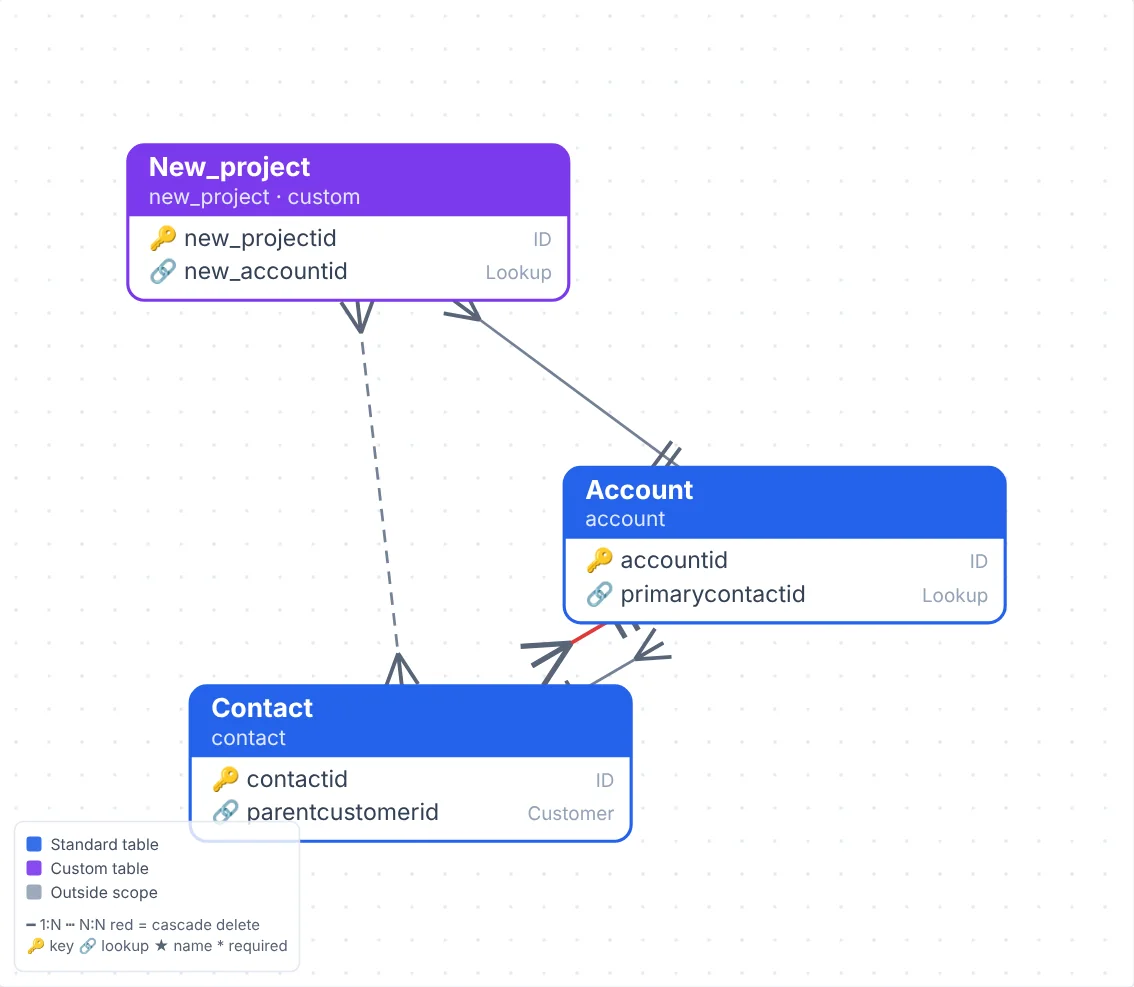
- Explore the diagram. Drag, zoom, search, and focus on one table and its neighbours. Colour tables by business area.
- Review the insights. Cascade deletes, isolated tables, missing descriptions and auditing gaps.
- Export. Documentation at four levels in Word, HTML, Markdown, Excel or JSON, plus SVG, PNG, Mermaid and draw.io diagrams.
Why teams use MDPM for this
- Ready for architecture reviews and audits
- Shows where personal data is held
- Exports to the formats your team already uses
- Regenerate any time the model changes
Common questions
Does it change anything in my environment?
No. Documentation only reads from your environment.
Can it document many-to-many relationships?
Yes, along with lookups, polymorphic lookups and cascade rules.
Try it on your own data
The free plan includes one environment and 10,000 rows a month.